
Email Phishing
Cours sur les emails
I) What makes up an email address?
- User Mailbox (or Username)
- @
- Domain
II) Protocols
- SMTP (Simple Mail Transfer Protocol) It is utilized to handle the sending of emails.
- POP3 (Post Office Protocol) Is responsible transferring email between a client and a mail server.
- IMAP (Internet Message Access Protocol) Is responsible transferring email between a client and a mail server.
A) POP3
- Emails are downloaded and stored on a single device.
- Sent messages are stored on the single device from which the email was sent.
- Emails can only be accessed from the single device the emails were downloaded to.
- If you want to keep messages on the server, make sure the setting "Keep email on server" is enabled, or all messages are deleted from the server once downloaded to the single device's app or software.
B) IMAP
- Emails are stored on the server and can be downloaded to multiple devices.
- Sent messages are stored on the server.
- Messages can be synced and accessed across multiple devices.
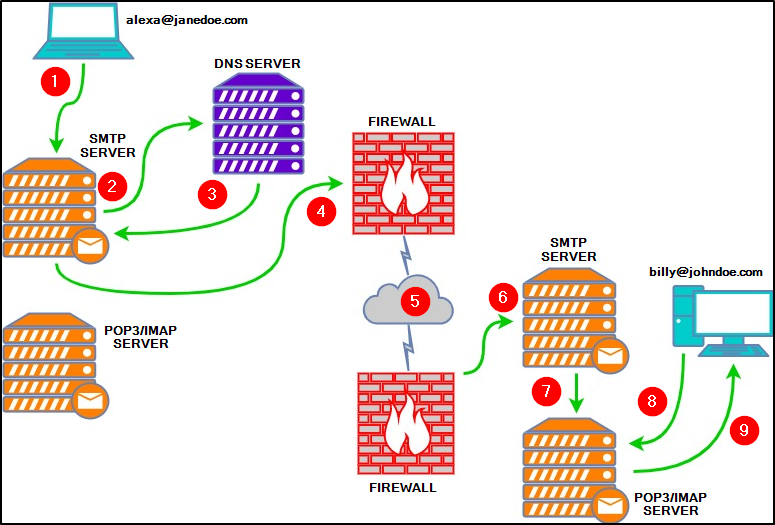
Each port has an unsecured and a secured version :
- SMTP : 465 (see STARTTLS)
- IMAP : 993
- POP3 : 995
III) Email components
Syntax : see Internet Message Format
A) Email Headers
It contains information about the email, such as the email servers that relayed the email.
Main fields :
- From - the sender's email address
- Subject - the email's subject line
- Date - the date when the email was sent
- To - the recipient's email address
Other fields of interest.
- X-Originating-IP The IP address of the email was sent from (this is known as an X-header)
- Smtp.mailfrom/header.from - The domain the email was sent from (these headers are within Authentication-Results)
- Reply-To / Return-Path - This is the email address a reply email will be sent to instead of the From email address
Warning : a malicious email sender can try to hide its real email address setting a legitimate address in the “Reply-To” field.
X-Originating-IP
Once you find the email sender's IP address, you can check the online reports on :
B) Email Body
The important points regarding the structure and components of email bodies are the attachments and the links. For the link, you can check them using this (mainly online) tools :
- VirusTotal
- URLScan.io
- SUCURI (quick scan of known malicious content or vulnerabilities)
- CheckShortURL (preview where the link redirects)
- curl -I http://example.com : to see only headers
For the attachment, here are the main fields :
- Content-Type: Specifies the type of attachment. For instance:
Content-Type: application/pdffor PDF files.
Content-Type: text/htmlfor HTML content in the body.
- Content-Disposition: Defines whether the content is an attachment or inline.
Content-Disposition: attachmentdenotes an attachment.
Content-Disposition: inlineshows it as embedded within the email.
- Content-Transfer-Encoding: This indicates how the content is encoded, often base64 for attachments. Base64 encoding is commonly used to embed binary files (like PDFs) directly within the email body as text.
- To access these attachments, you can decode the base64 data and save it to your machine.
IV) Recap
- From: sender’s email address
- To: recipient
- Subject: can hint at phishing.
- Date: date and time the email was sent.
- MIME-Version: MIME version used, which indicates format and multipart
- Content-Type: Specifies if the email is in text/plain or text/html. For attachments, it will specify the file type (application/pdf/…)
- Content-Transfer-Encoding: the encoding format
- Message-ID: unique identifier, useful for tracking or verification.
Comment analyser un email ?
I) Collecte des Informations Essentielles
>En têtes
Objectif : retracer le chemin emprunté par le message
Champs :
- Adresse Email de l'Expéditeur : vérifier cohérence entre le nom affiché et l'adresse email réelle;
- Adresse IP de l'Expéditeur : Identifiez l'IP source avec les outils évoqués précédemment;
- Résolution Inverse de l'IP : Confirmez que l'IP correspond bien au domaine de l'expéditeur via une recherche PTR. → https://mxtoolbox.com/ReverseLookup.aspx;
- Objet : Recherchez des indices de phishing tels que l'urgence ou des demandes inhabituelles;
- Adresse Email du Destinataire : S’assurer que l'email nous est bien destiné et non à un groupe indéfini via CC/BCC;
- Adresse de Réponse (Reply-To) : Les attaquants peuvent rediriger les réponses vers une adresse différente;
- Date/Heure : Vérifiez les incohérences temporelles.
>Corps du Message / Pièces Jointes
- Liens URL : Extraire et analysez tous les liens;
- Pièces Jointes : Identifiez les fichiers attachés, notez leurs noms et extensions;
- Hashes des Pièces Jointes : vérifier les hash avec VirusTotal.
II) Analyse des En-Têtes
>Outils en Ligne
- Google Admin Toolbox Messageheader : Analyse les en-têtes pour détecter les anomalies SMTP;
- Mailheader.org : Fournit une analyse détaillée des en-têtes pour repérer les incohérences.
>Vérification des Protocoles d'Authentification
- SPF (Sender Policy Framework) : Vérifiez si l'IP de l'expéditeur est autorisée à envoyer des emails pour le domaine. Utilisez des outils comme “dmarcian SPF Surveyor” pour valider les enregistrements SPF;
- DKIM (DomainKeys Identified Mail) : Confirmez l’intégrité en vérifiant la signature;
- DMARC (Domain-based Message Authentication, Reporting, and Conformance) : Combine SPF et DKIM.
>Analyse de l'Adresse IP
- IP : Utilisez les outils précédents, ou IPinfo.io et Talos Intelligence pour obtenir des informations sur l'IP;
- Vérification de Réputation
III) Analyse du Corps du Message
Dans un premier temps, il est souvent intéressant de rechercher des fautes d’orthographe, ainsi que la cohérence du message.
Ensuite, il faut extraire et analyser les liens contenus dans le corps du message.
IV) Analyse des Pièces Jointes
Récupérer les pièces jointes, calculer leurs hashes, les analyser :
- VirusTotal
- Hybrid Analysis
>Analyse dynamique
Sandboxes en Ligne :
- Any.Run
- Joe Sandbox
Observation des Comportements :
- Connexions réseau;
- Modifications du registre ou du système de fichiers;
- Processus créés ou injectés.
Projets d’analyse d’emails
I) https://github.com/keraattin/EmailAnalyzer
Ce projet réalisé en python et dédié à l’analyse de fichiers .eml permet de faciliter l’analyse d’un email. Il prend en entrée un email, et sort un rapport de l’analyse au format HTML . Il dispose de plusieurs options pour récupérer un ensemble de données d’analyse :
  -H, --headers         To get the Headers of the Email
  -d, --digests         To get the Digests of the Email
  -l, --links           To get the Links from the Email
  -a, --attachments     To get the Attachments from the Email
  -i, --investigate     Activate if you want an investigation
Il permet aussi des résultats en ligne de commande, bien que la version sur navigateurs soit plus appropriée pour facilement naviguer sur les sites d’analyse.
II) https://github.com/cyberdefenders/email-header-analyzer
Email Header Analyzer est une alternative aux solutions proposées par Google, Mxtoolbox et Microsoft. Il est développé en Flask, et se dit plus exhaustive. Il permet les actions suivantes :
- Identify hop delays.
- Identify the source of the email.
- Identify hop country.
On notera que son fonctionnement est le meme que celui souhaité dans l’application à développer.
III) https://github.com/borjaRivera/email-analyzer-vt
Ce projet permet d’analyser les emails d’un compte gmail.
IV) https://github.com/wahlflo/eml_analyzer
eml_analyzer est un script CLI qui permet d’analyser un fichier .eml. Il permet notamment d’afficher sa structure et d’extraire toutes ses pièces jointes.
V) https://github.com/emalderson/ThePhish
ThePhish est un application web développée en Flask et basée sur TheHive, Cortex and MISP. Elle automatise tout le processus d’analyse d’email. C’est un outil très puissant qui se suffit à lui-même.